Booking a Virgin Voyages cruise online is straightforward once you know which choices matter. The process comes down to selecting a voyage, choosing a cabin type, comparing fare options, reviewing the complete price and deciding whether to place a hold, pay a deposit or pay in full.
The details deserve a little more attention. Your fare affects whether you can change the voyage or cabin, when you can reserve dining and what level of Wi-Fi is included. Virgin also assigns the cabin for you, although some fares allow the location to be changed later when another cabin is available.
This guide walks you through the booking screens in order. If you start through my First Mate link, you still browse and book within Virgin Voyages' own system, but I am connected to the reservation so I can help after you book.
The short version: how to book Virgin Voyages
- Open my connected Virgin Voyages booking page.
- Filter the voyages by destination, dates and other priorities.
- Select a sailing and confirm its itinerary, ship and departure date.
- Enter the number of Sailors in your cabin.
- Choose a cabin category and cabin type.
- Compare the available fare choices and restrictions.
- Review the complete price, including taxes, fees and service gratuities.
- Place a 24-hour hold when eligible, pay the required deposit or pay in full.
- Save the confirmation and contact me to review the reservation.
Virgin describes its online process in the same basic order: select the itinerary, choose the cabin and fare, confirm the details and pay. The decisions inside those steps are where this guide will help. Read Virgin Voyages' official booking overview.
Step 1: Begin with my First Mate booking link
Start with the Let's Go Book page connected to Melissa Lagerquist Travel.
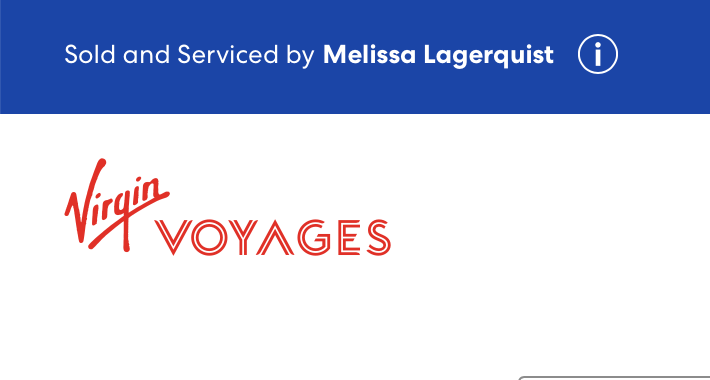
This is Virgin Voyages' voyage planner, not a separate travel-agency checkout. My agency and First Mate identifiers are carried into the booking through the link. During the process, look for Sold and Serviced by Melissa Lagerquist as confirmation that I am attached to the reservation.
Using my link does not add a separate planning fee to the cruise fare. The price, promotion, availability and terms displayed by Virgin govern the reservation. You can read more about that relationship in Why Book Virgin Voyages With a First Mate?.
Step 2: Filter and compare available voyages
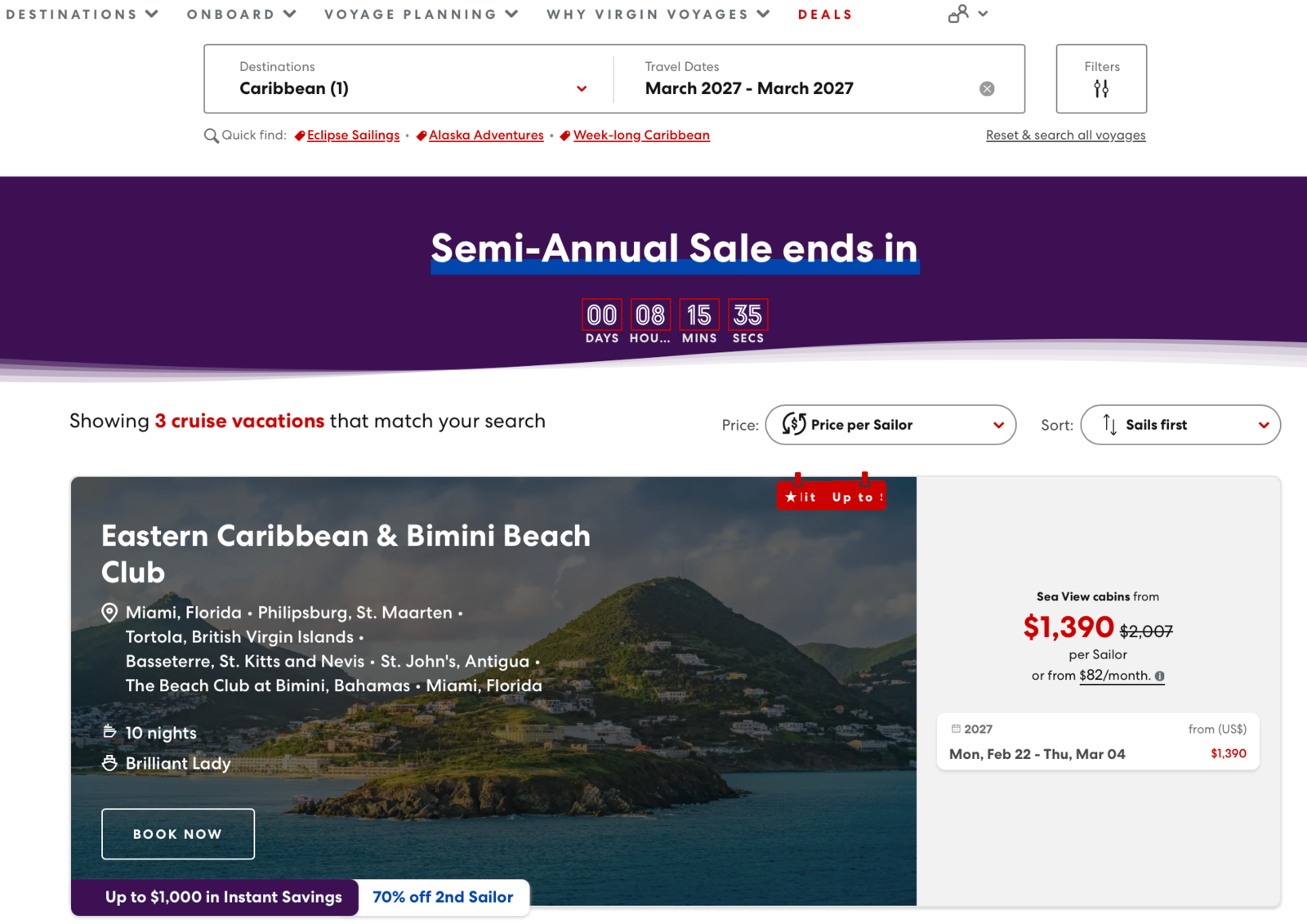
Use the voyage planner to narrow the results by destination and travel dates. You may also see controls for currency, cabin count and additional filters. Start broadly if your dates are flexible, then narrow the results once you see which itineraries are available.
Each result card normally shows the itinerary name, departure port, ports of call, number of nights, ship and selected departure dates. The first price shown is generally a starting price per Sailor, not necessarily the complete price for everyone in the cabin. Continue far enough into the booking to see the full price breakdown before comparing two sailings. See the current voyage planner.
When comparing voyages, look beyond the promotional headline. Consider:
- The embarkation port and the cost of reaching it
- The actual ports and time available in each destination
- The number of sea days
- Whether a port requires tender access
- The ship and sailing date
- The cabin category used for the advertised starting price
If you are deciding among Scarlet Lady, Valiant Lady, Resilient Lady and Brilliant Lady, use my Virgin Voyages ship comparison before choosing solely by price.
Step 3: Open the sailing and confirm the details
Select the departure date you want and open the sailing. Review the itinerary again before moving to cabins. Confirm the year as well as the month and day, especially when the same itinerary appears on several dates.
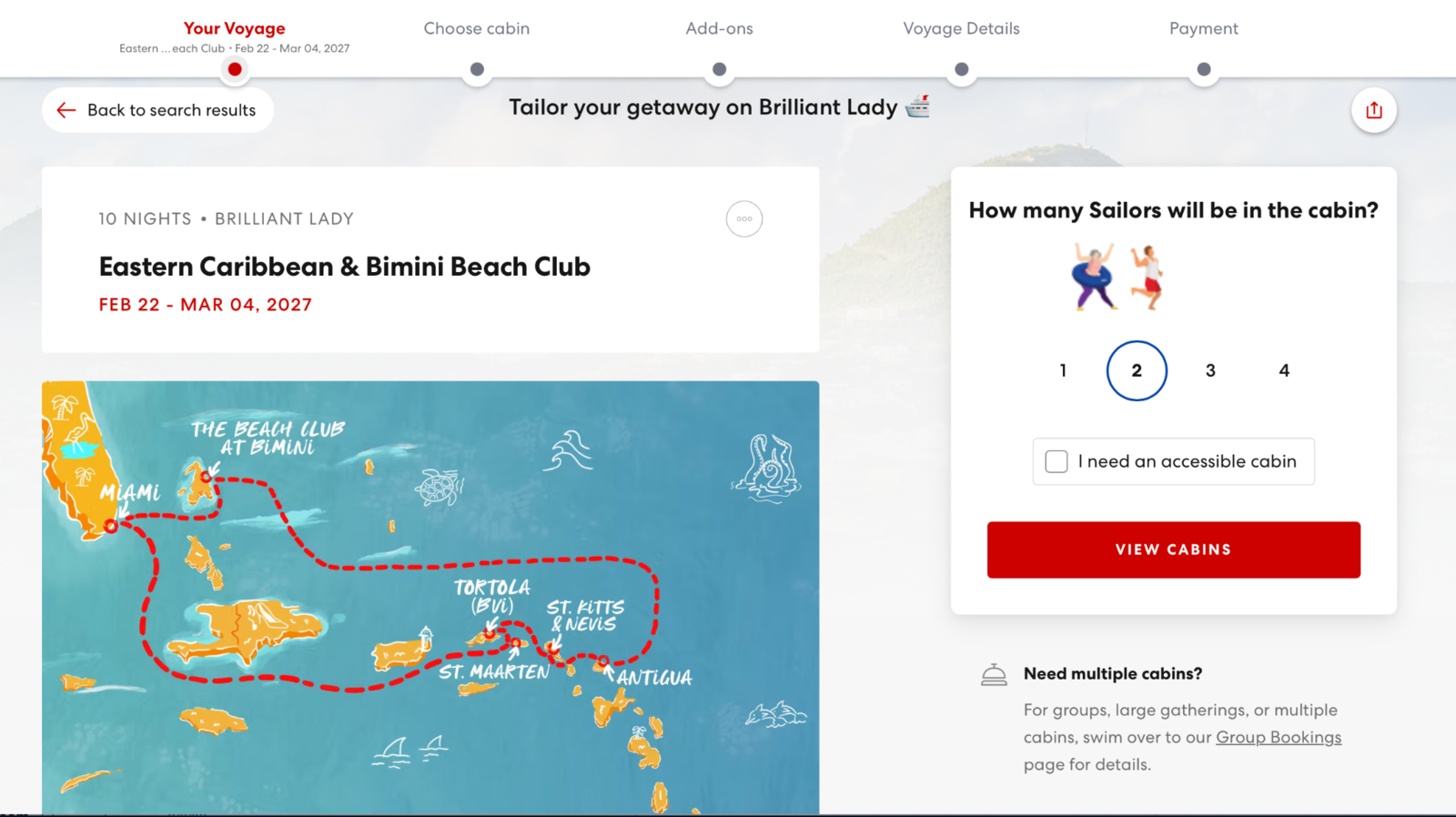
The next screen asks how many Sailors will share the cabin and whether an accessible cabin is needed. Virgin's cabins accommodate between one and four Sailors depending on the room selected. See Virgin Voyages' official cabin FAQ.
If you need more than one cabin, do not assume that separately booked rooms will be near each other. Contact me before completing the reservations if proximity, connecting cabins or coordinated dining is important.
Step 4: Choose your cabin category and type
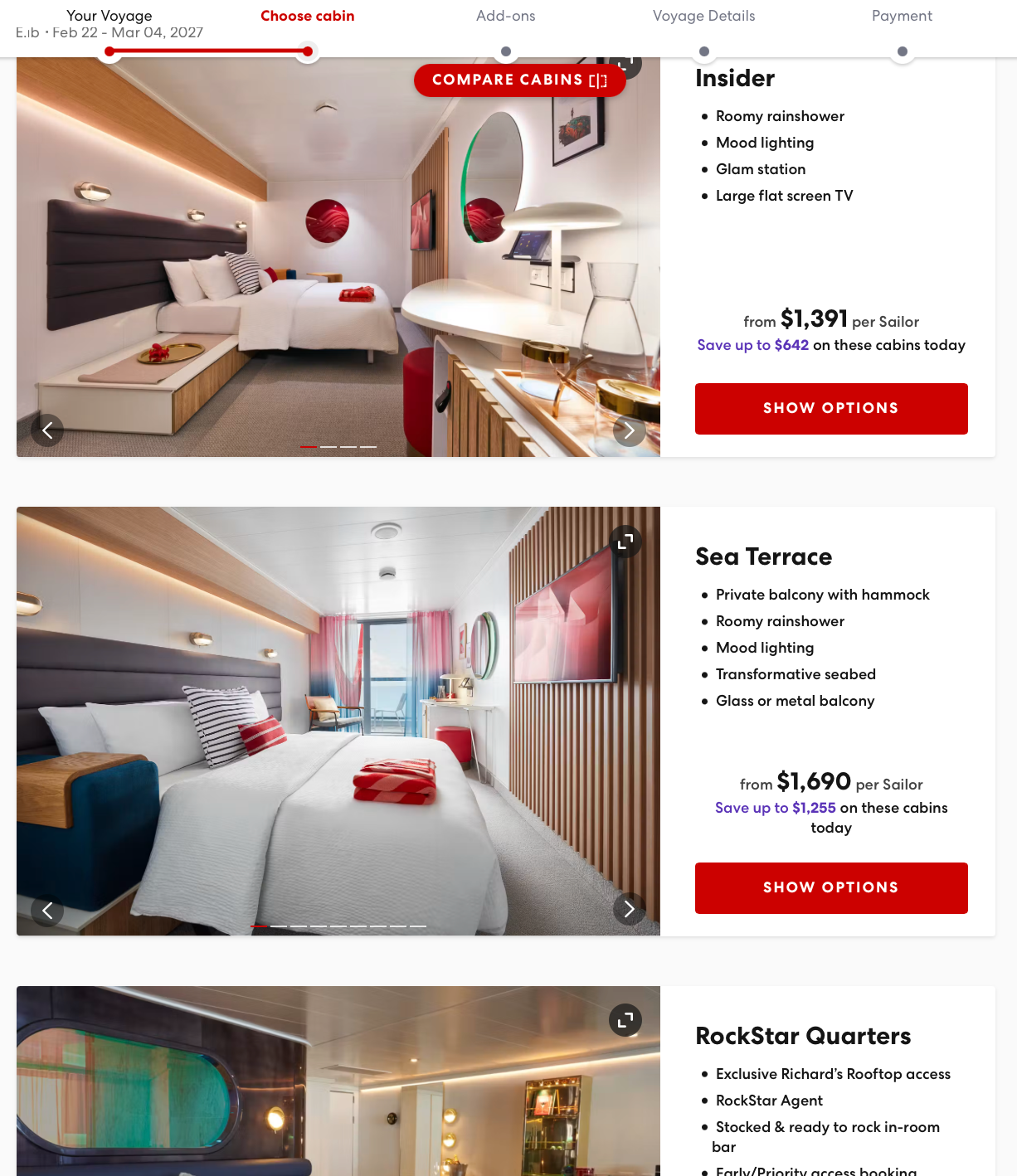
Virgin groups its accommodations into several broad choices. You can also review the descriptions on Virgin's official cabins page:
- Insider: An interior cabin without a window
- Sea View: A cabin with an ocean window but no private terrace
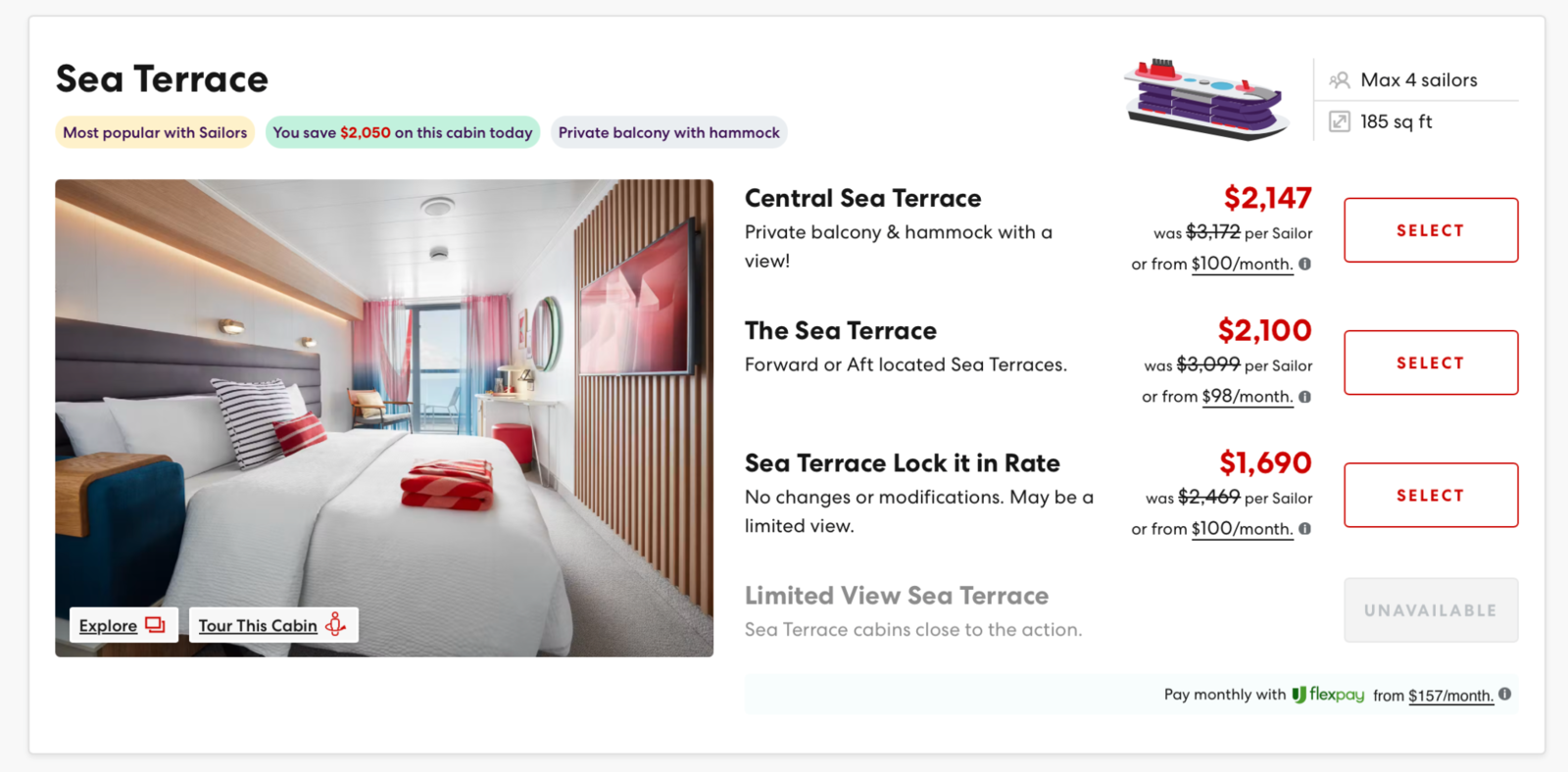
- Sea Terrace: A private balcony, generally with Virgin's red hammock
- RockStar and Mega RockStar Quarters: Suites with additional access and service benefits
Within those categories, you may see choices such as Solo Insider, Social Insider, Limited View Sea Terrace, Central Sea Terrace or XL Sea Terrace. The best choice depends on how much you value natural light, outdoor space, bathroom layout, location and suite benefits.
For a fuller comparison, read Virgin Voyages Cabins Explained or my detailed Sea Terrace vs. XL Sea Terrace comparison.
Virgin selects the cabin for you
For current bookings, Virgin automatically assigns the cabin after you select the cabin type. What happens next depends on the fare:
- A Lock It In booking guarantees the selected category or higher, but Virgin assigns the exact location closer to sailing and cabin changes are not permitted.
- A Base booking receives an automatically assigned cabin within the selected cabin type, and cabin changes are not permitted.
- Essential and Premium bookings receive an automatically assigned cabin, but the location may be changed later if another eligible cabin is available.
- Non-Lock It In RockStar and Mega RockStar suites are also assigned automatically, and a change may be possible subject to availability.
These assignment and change rules are confirmed in Virgin Voyages' current cabin-selection policy.
Want me to check your cabin location?
If you book an Essential or Premium fare through my First Mate link, send me your booking information after the reservation is confirmed. I can review the available cabins and look for a location that better matches your priorities, such as a more central position, shorter walks, convenient elevator access, less potential motion or greater distance from busy public areas.
If a better eligible cabin is available, I can help request the change. Cabin changes remain subject to availability and your fare rules. Base and Lock It In bookings do not allow cabin changes.
This does not mean a First Mate has secret cabin inventory. A traveler who books directly can contact Sailor Services about an eligible change. The advantage of booking through my link is having someone who will examine the location, discuss the tradeoffs and handle the request with the context of your trip. Virgin directs eligible Sailors to either Sailor Services or their First Mate for cabin relocations and upgrades. See Virgin's cabin-upgrade guidance.
Step 5: Compare the fare choices carefully
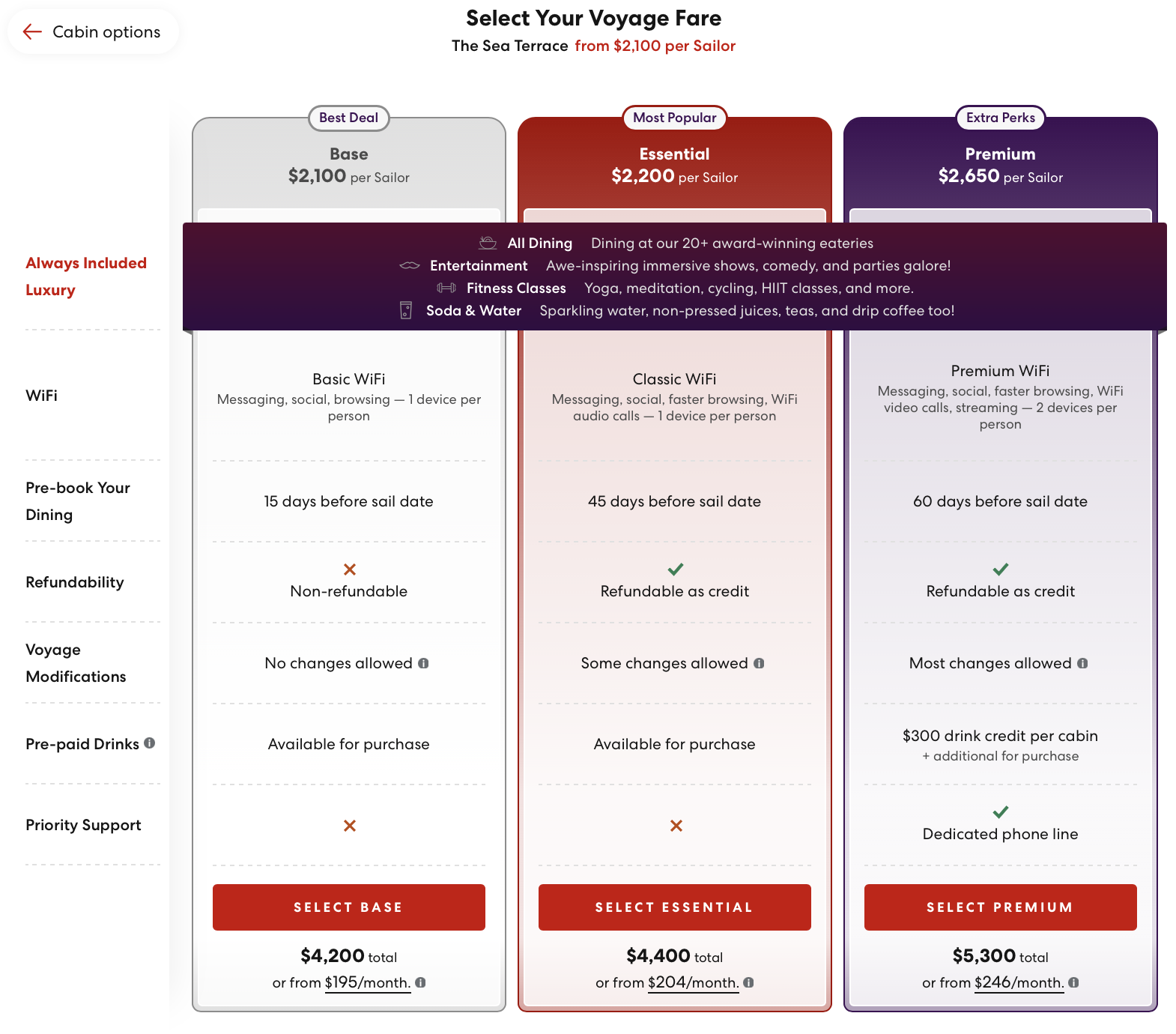
For Sea Terrace cabins and below, Virgin's current VoyageFair Choices are Base, Essential and Premium. Lock It In may also appear on selected sailings as a more restrictive guarantee rate. RockStar and Mega RockStar suites have separate suite terms. Review Virgin Voyages' official VoyageFair Choices.
If you want to examine this decision before continuing, read my focused Virgin Voyages Base vs. Essential vs. Premium comparison. It explains the Wi-Fi, dining windows, cancellation rules, name changes, cabin flexibility and Premium Bar Tab in practical terms.
| Fare | Cabin and change considerations | Dining reservations | Wi-Fi and notable features |
|---|---|---|---|
| Lock It In | Guarantee assignment; nonrefundable; no name, cabin or date changes | 15 days before sailing | Review the Wi-Fi details displayed for the selected sailing |
| Base | Cabin type selected and cabin automatically assigned; nonrefundable; no name, cabin or date changes | 15 days before sailing | Basic Wi-Fi |
| Essential | Cabin and voyage changes allowed under the applicable policy; name changes limited to secondary Sailors | 45 days before sailing | Classic Wi-Fi |
| Premium | Greater name and voyage flexibility under the applicable policy | 60 days before sailing | Premium Wi-Fi for two devices, daily drink credit and priority pre-voyage support |
| RockStar or Mega RockStar | Suite terms apply; avoid Lock It In if location and flexibility matter | 120 days before sailing | Suite benefits vary by category |
Dining windows and Wi-Fi distinctions are described in Virgin's VoyageFair announcement, dining FAQ and Wi-Fi FAQ. Cancellation, name-change and voyage-change rights depend on the fare and timing, so read the current pre-voyage policies before paying.
Which Virgin Voyages fare should you choose?
The lowest number is not automatically the best value.
Base or Lock It In can make sense when your plans are firm, price is the overriding priority and you accept the cabin-assignment and no-change rules.
Essential is the sensible comparison point for many travelers because it restores meaningful flexibility, provides Classic Wi-Fi and opens dining reservations earlier than Base.
Premium deserves a closer look when its drink credit, faster Wi-Fi, earlier dining access and additional flexibility are worth the price difference to you.
Compare the actual dollar difference on your sailing. Fare prices vary, so the right answer cannot be determined from the fare names alone.
Step 6: Review the complete price
Before entering payment information, slow down and examine the full summary. Look for:
- The voyage fare for all Sailors
- The promotion or savings applied
- Taxes and fees
- Service gratuities
- Voyage Protection or other optional additions
- The amount due now
- The remaining balance and final-payment date
- The fare's cancellation and change terms
Virgin currently charges service gratuities separately. Prepaying costs $20 per Sailor per night; paying onboard costs $22 per Sailor per night. Prepaid gratuities are locked in and nonrefundable. Once the service gratuity is covered, Virgin says additional tips are not added to drinks, dining or spa services. Read Virgin's current service-gratuity policy.
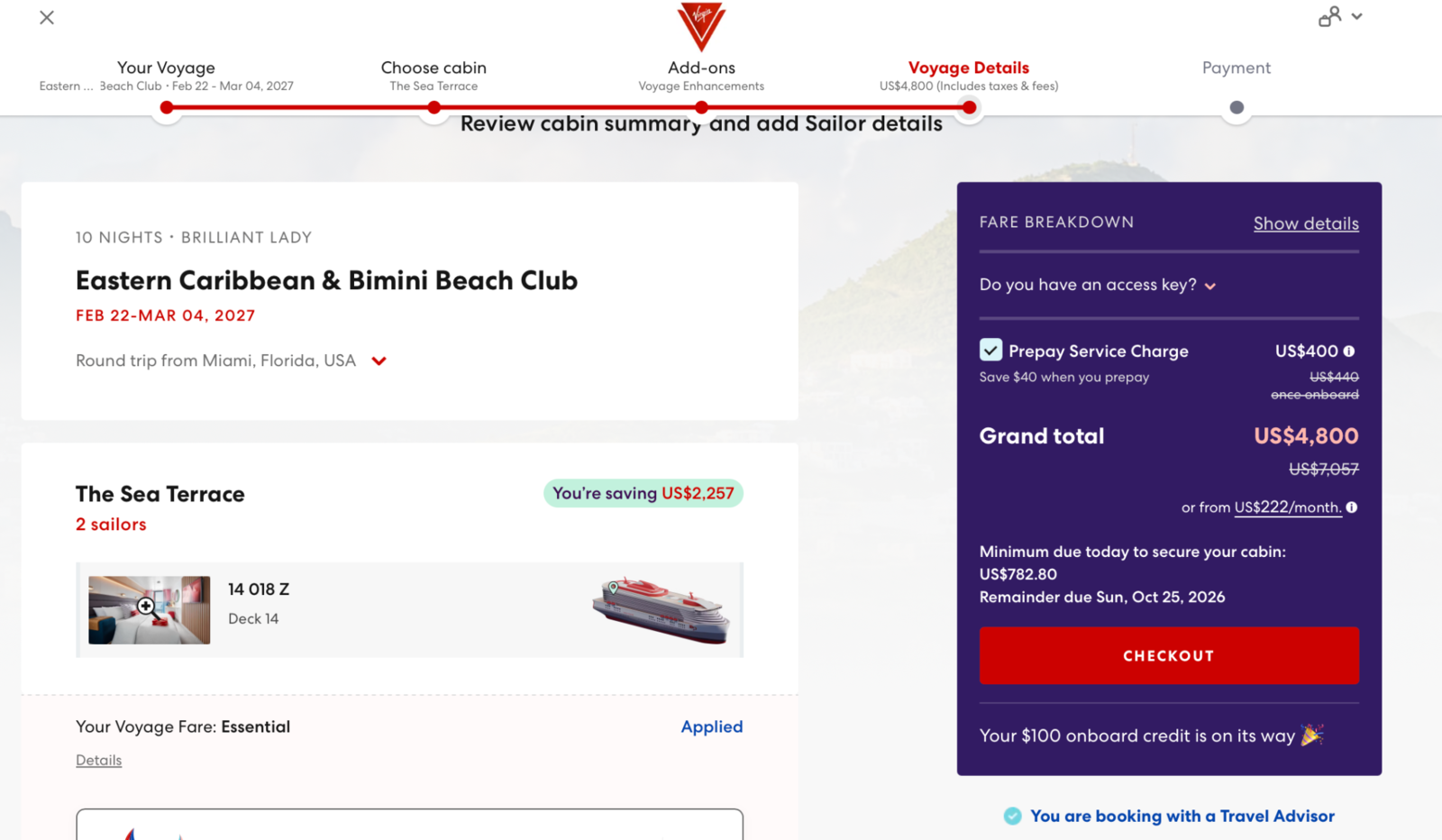
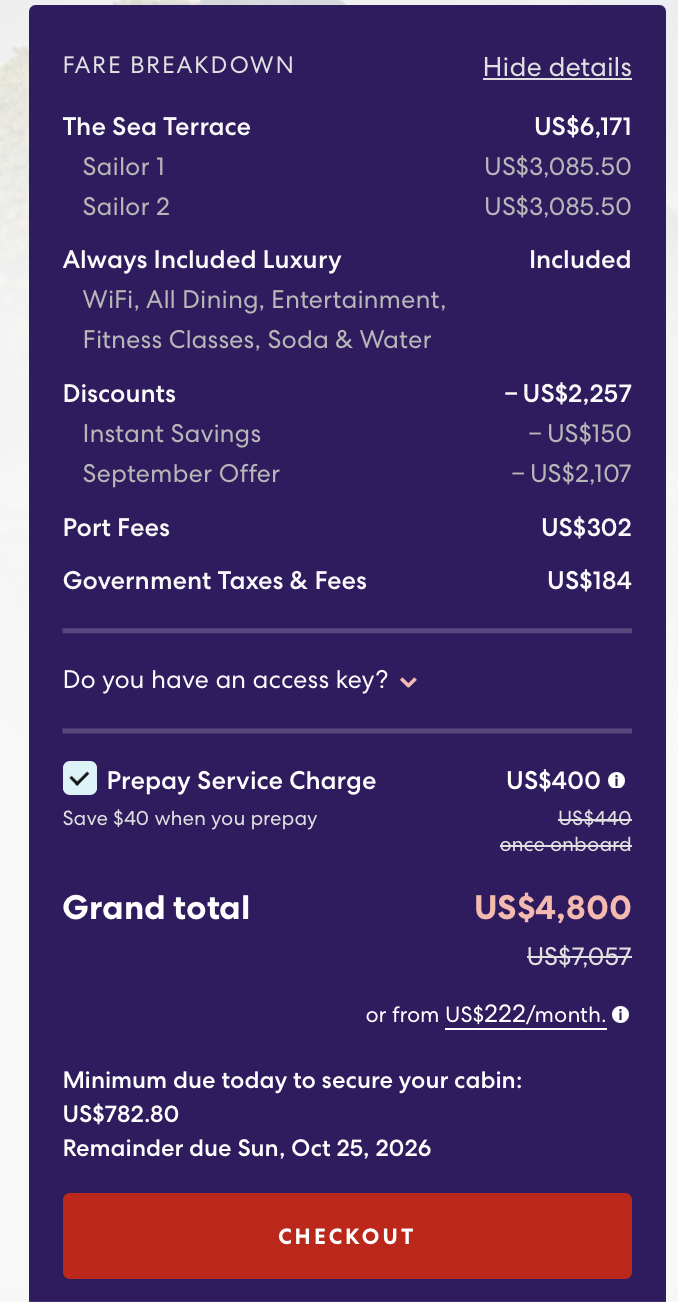
Do not judge a promotion solely by the crossed-out price or percentage in the headline. The complete checkout summary and the restrictions attached to the selected fare are what matter.
Step 7: Hold the cabin, pay the deposit or pay in full
If the sailing is at least 45 days away, Virgin may offer its 24 Hour Breather, which holds the reservation for 24 hours without payment. The reservation must then be finalized through My Account with the required deposit or full payment. See Virgin's official booking-options FAQ.
For bookings made more than 120 days before departure, the standard deposit is 20% of the voyage fare, excluding taxes and fees. Final payment is due 120 days before the voyage. When booking within 120 days, the complete voyage fare is due at booking. Virgin currently accepts major cards, Apple Pay, Google Pay and PayPal, and it also offers Flexpay financing to eligible residents of the United States and Canada. See Virgin's payment FAQ.
If you are using the 24-hour hold because you want me to review the cabin or fare, contact me promptly and finalize the reservation before the hold expires.
Step 8: Enter the Sailor information and confirm
Enter each traveler's legal name exactly as it appears on the identification that will be used for the voyage. Recheck the email address, birth date, ship, sailing date, cabin type, fare, currency and complete price before submitting payment.
Confirm once more that the page identifies Melissa Lagerquist as the servicing First Mate. Save the booking confirmation and the fare terms. Then send me the reservation information so I can verify that the booking reached my agency account and review the assigned cabin if your fare permits changes.
Do not send credit-card information by email.
What I can help with after you book
Booking through my First Mate link gives you the convenience of completing the reservation yourself while adding a consistent person who knows the booking. Depending on your fare and the availability, I can help you:
- Review the cabin Virgin assigned and search for a more suitable available location
- Explain fare restrictions, payment dates and planning deadlines
- Double-check the ship, date, cabin, fare and promotion shown
- Assist with eligible cabin, name or voyage changes
- Help organize dining reservations when your booking window opens
- Assist with Shore Things planning
- Coordinate multiple cabins or determine whether a group program may apply
- Communicate with Virgin when a reservation question arises
Virgin allows eligible booking changes and payments to be handled through a First Mate. It also permits dining reservations and Shore Things to be arranged through a travel advisor. New-booking help, payment options, dining reservations and Shore Things are explained in Virgin's current FAQs.
I cannot override Virgin's fare rules, create cabin inventory or guarantee a promotion. My role is to help you understand the choices, examine the details and navigate the options that apply to your reservation.
What to do immediately after booking
- Save your confirmation and booking number.
- Create or sign into your Virgin Voyages account using the same information associated with the reservation.
- Connect the booking in the Virgin Voyages app.
- Record the final-payment deadline.
- Record the date when your dining reservations open.
- Contact me if you would like the cabin assignment reviewed.
Virgin's account system lets Sailors view booking details, make payments, add experiences and complete Ready to Sail information. If the reservation does not appear automatically, it can be connected using the booking information. See Virgin's My Account FAQ.
For dining, boarding, Bar Tab, Scarlet Night and the app, continue with Virgin Voyages for First-Timers: What to Know Before You Book.
Frequently asked questions
Is it more expensive to book through Melissa's First Mate link?
Using my link does not add a separate planning fee to Virgin's displayed cruise fare. Always review the complete price, including taxes, gratuities, optional additions and fare restrictions, before paying.
Does Virgin Voyages let me select an exact cabin?
The online booking system assigns the cabin after you choose a cabin type. Essential and Premium bookings may be moved to another eligible cabin later when availability permits. Base and Lock It In fares do not permit cabin changes. Virgin cabin-selection policy.
Can Melissa change the cabin Virgin assigned?
If your fare permits cabin changes, I can review the available inventory and help request a different eligible cabin. A change is never guaranteed and remains subject to availability and Virgin's rules.
What is the difference between Base and Lock It In?
Both are restrictive, nonrefundable options. Base assigns a cabin within the specific cabin type selected. Lock It In guarantees the booked category or higher, but Virgin chooses the exact subtype and location closer to sailing. Neither allows cabin, name or voyage-date changes. Virgin's fare and cabin rules.
How much is the Virgin Voyages deposit?
When booking more than 120 days before the sailing, the standard deposit is 20% of the voyage fare, excluding taxes and fees. Full payment is required when booking within 120 days. Virgin payment policy.
Can I hold a Virgin Voyages reservation without paying?
Virgin's 24 Hour Breather can hold an eligible reservation without payment for 24 hours when the sailing is at least 45 days away. Virgin booking-options FAQ.
When is final payment due?
Final payment is due 120 days before the voyage. If the reservation is made inside that window, full payment is due when booking. Virgin payment policy.
Can I change or cancel the reservation later?
That depends on the fare and the date of the request. Base and Lock It In are nonrefundable and do not allow name or voyage-date changes. Essential, Premium and non-Lock It In suites offer different forms of flexibility within specified time periods. Read the rules attached to your reservation and Virgin's current cancellation and change policy.
What if I already booked directly with Virgin?
Virgin currently permits an eligible direct reservation to be transferred to a travel advisor within 30 days of its creation if it has not been paid in full. Contact me promptly so eligibility can be confirmed before you make further changes. Virgin's new-bookings FAQ.
Ready to find your voyage?
Browse Virgin's current sailings through my connected First Mate link. You can complete the booking yourself, and I will be attached as your First Mate to help with the reservation.
Planning note and official references
Details, prices, promotions, screens and policies can change. Information was reviewed September 10, 2026. Confirm the terms displayed for your specific sailing before booking.
Booking overview · VoyageFair Choices · Choosing your cabin · Cabin upgrades · Booking options · Payments · Pre-voyage policies · Dining · Wi-Fi · Shore Things